Attributes - How do I make dropdowns start with "Please Select"
Prompting the customer to select an option value
In a dropdown, you can start with an attribute value:
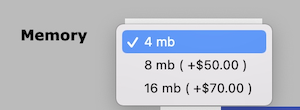
or you can start with a prompt like “Please Choose” or “Select a Value”:
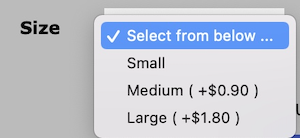
The former requires no special steps; just add options to products as described in Attributes - adding to products.
The latter requires setting a default option value for each Option Name that will have this behavior.
- Go to Admin > Catalog > Option Value Manager
- Select the Option Name that will have this option value. In the second image, it would be “Size.”
- Create an value option value with the prompt you wish to use (e.g. “Please Select”).
- Go to Attributes Controller, and select the product you want to operate on.
- Select the option name (e.g. “Size”) and option value (e.g. “Please Select”).
- Click “Used For Display Purposes Only” = “Yes.
- Click “Default Attribute to be Marked Selected” = “Yes.
- Click the Insert button.
Note: To make this option show at the top of the list, give it a sort order less than all the other sort orders when adding it in Attributes Controller. You may use a negative number if needed.
Still have questions? Use the Search box in the upper right, or try the full list of FAQs. If you can't find it there, head over to the
Zen Cart support forum
and ask there in the appropriate subforum.
In your post, please include your Zen Cart and PHP versions, and a link to your site.
Is there an error or omission on this page? Please post to General Questions on the support forum. Or, if you'd like to open a pull request, just review the guidelines and get started.
You can even PR right here.
Last modified December 18, 2022 by Scott C Wilson (fcfbaf43).